

Establishing a clear and repeatable path for every dollar that enters your organization is the bedrock of sustainable fundraising. Therefore, it’s important that your team can see exactly where data flows, how opportunities for expanded impact are flagged, and where gift processing bottlenecks occur.
This comprehensive guide explores how nonprofits can map their back-office donation data and leverage strategic imagery to eliminate friction, accelerate training, and maximize donor retention. We’ll cover:
- What is nonprofit gift processing?
- The true cost of invisible data: why your workflows need imagery
- How to visualize your organization’s gift processing workflows
Transitioning from messy lists to clean visual charts completely changes how your development team operates day to day. Rather than feeling lost in a maze of technical procedures, each employee gains a bird’s-eye view of your financial operations.
Let’s examine a comprehensive blueprint for building and leveraging a visual gift-processing framework. But first, we’ll start with the basics.
What is nonprofit gift processing?
Nonprofit gift processing is the administrative system your organization uses to accept, log, and organize incoming charitable contributions. The cycle begins the moment a supporter makes a contribution and ends when the money is safely in your bank account and recorded in your donor database. This operational framework covers every type of funding your organization handles, from small-dollar cash donations to large corporate grants.
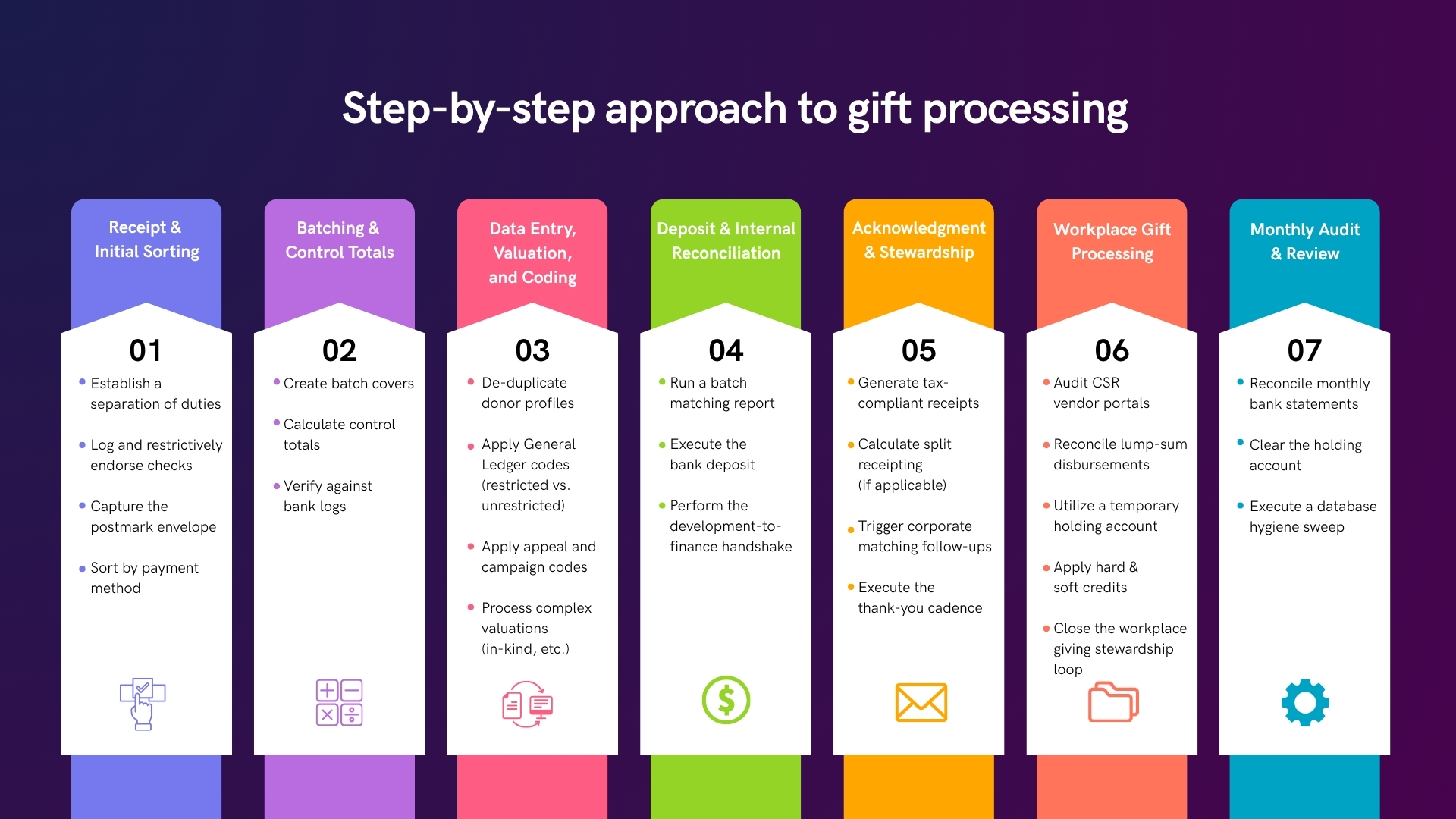
Why does effective nonprofit gift processing matter?
When your office handles gift processing correctly, you ensure that every dollar is tracked with total financial accuracy. This setup involves verifying check amounts, processing credit card batches, reconciling workplace giving payments, and updating donor profiles.
Having a reliable setup prevents lost checks and avoids messy bookkeeping errors. By establishing a clear visualization of your processing steps, your team can easily track every available revenue stream without losing valuable data along the way.
The true cost of invisible data: why your workflows need imagery
Many nonprofit operations suffer from a lack of visual clarity. When gift-processing steps live exclusively in a dry text document or worse, in an employee’s head, the organization faces serious operational vulnerabilities. New hires spend weeks trying to decipher the exact sequence for entering checks, managing credit card batches, and tracking corporate giving disbursements.
This lack of transparency causes inconsistent data entry, delayed follow-up communications, and stressed-out development teams.
When a process is unclear or intangible, finding mistakes becomes an expensive guessing game. Not to mention, staff members struggle to understand how their individual tasks connect to the broader fundraising ecosystem.
However, the true danger of invisible data lies in the revenue that quietly slips through the cracks. This can include:
- Abandoned gifts – Complicated or sluggish backend systems can create significant administrative friction at checkout, causing frustrated supporters to abandon their digital shopping carts mid-transaction.
- Unclaimed corporate support – Double the Donation research indicates that 26+ million individuals work for companies that offer matching gift programs, yet $4-$7 billion in match revenue goes unclaimed each year. When your administrative layout fails to clearly indicate where to find workplace giving opportunities, your organization misses out on easy funding that could otherwise support your vital community mission.
- High rates of lapsing donors – Clear, immediate acknowledgments assure donors that their personal information was handled securely and that their check arrived safely at its intended destination. Those who do not receive timely updates on their contributions, often due to poorly designed gift-processing systems, feel forgotten or ignored, leading to a significant drop in retention.
By introducing clear imagery into your internal documentation, you turn a confusing backend chore into an intuitive roadmap that anyone on your team can interpret at a glance.
How to visualize your organization’s gift processing workflows
Transforming your daily office routines into an aesthetically pleasing blueprint requires a structured approach. You cannot simply map every detail without creating confusion for your staff. By breaking the visualization process down into manageable, chronological steps, you can build an accurate reference that reflects your actual operations.
Here’s how you can get started.
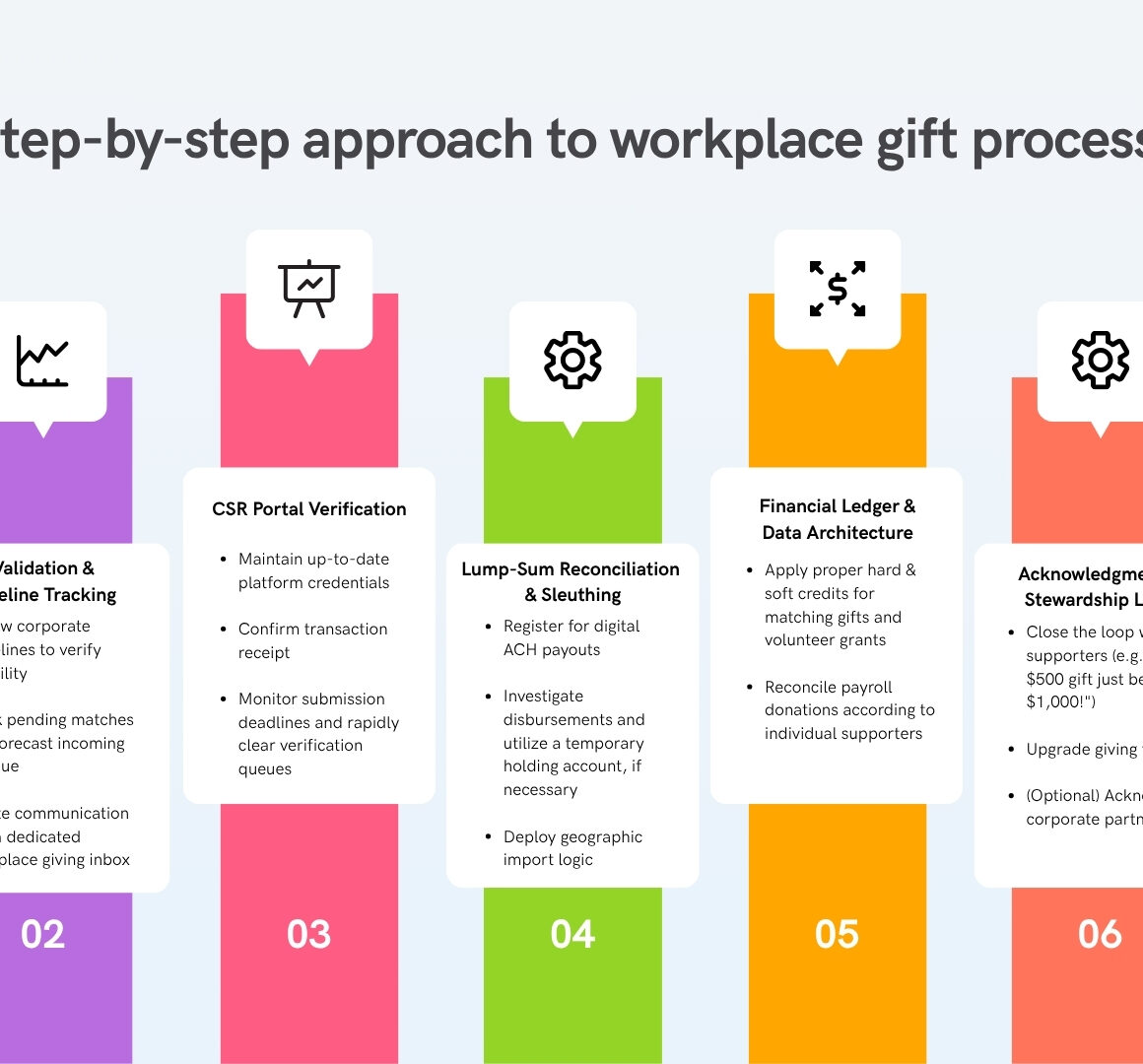
Step #1: Conduct a backend audit.
The first step in building your workflow blueprint is to gather the exact technical details of your existing donation processing operations. You should bring your database administrators, gift entry officers, and accounting staff together for a collaborative mapping session. Ask your team to walk through every single micro-step that occurs from the second a donation arrives at your office or hits your bank account until it is officially reconciled.
During this discovery phase, it’s essential to document every manual touchpoint, spreadsheet log, and verbal confirmation that your team relies on to keep records straight. This exercise frequently reveals undocumented habits or siloed knowledge. By writing down each minute task, you create the outline needed to build a visual chart that matches the realities of your daily backend operations.
Step #2: Categorize your revenue lanes.
A frequent mistake when designing processing charts is forcing every type of donation down the same pathway. Different fundraising revenue streams follow distinct financial and regulatory tracks, so your visualization should reflect these differences with horizontal swimlanes. For example, your standard online donations lane should feature a highly automated path from the web form directly into your database. However, your direct mail lane must detail the actions involved with physically opening and scanning checks.
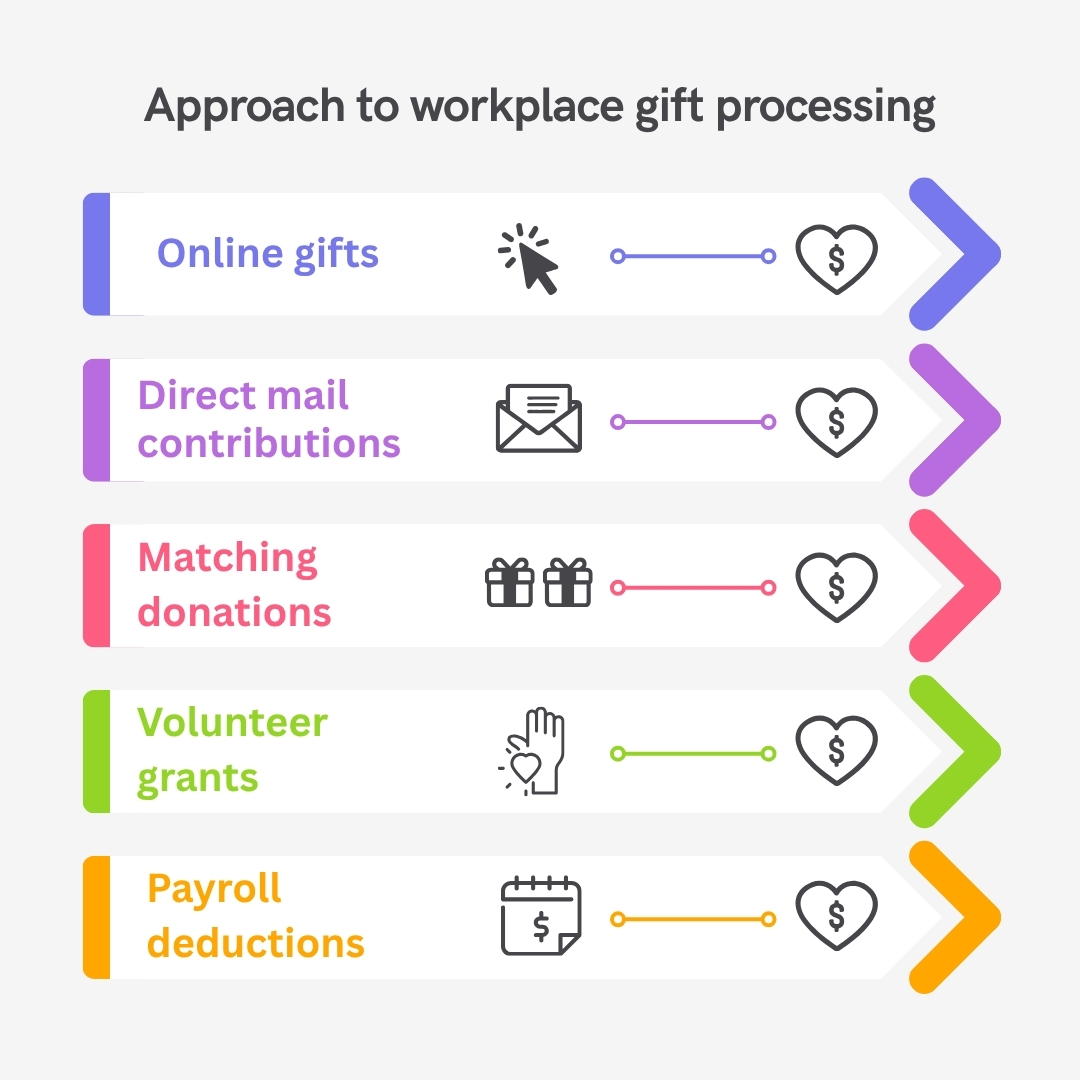
For the best results, organize your activities into parallel tracks so that staff can follow a single donation style from start to finish without getting distracted by unrelated steps.
You’ll also want to establish dedicated lanes for reconciling workplace giving streams, such as matching gifts, volunteer grants, and payroll deductions. Isolating these corporate giving streams ensures your team knows exactly how to handle the specialized documentation, separate ledger requirements, and unique corporate vendor payouts.
Step #3: Identify the key decision points.
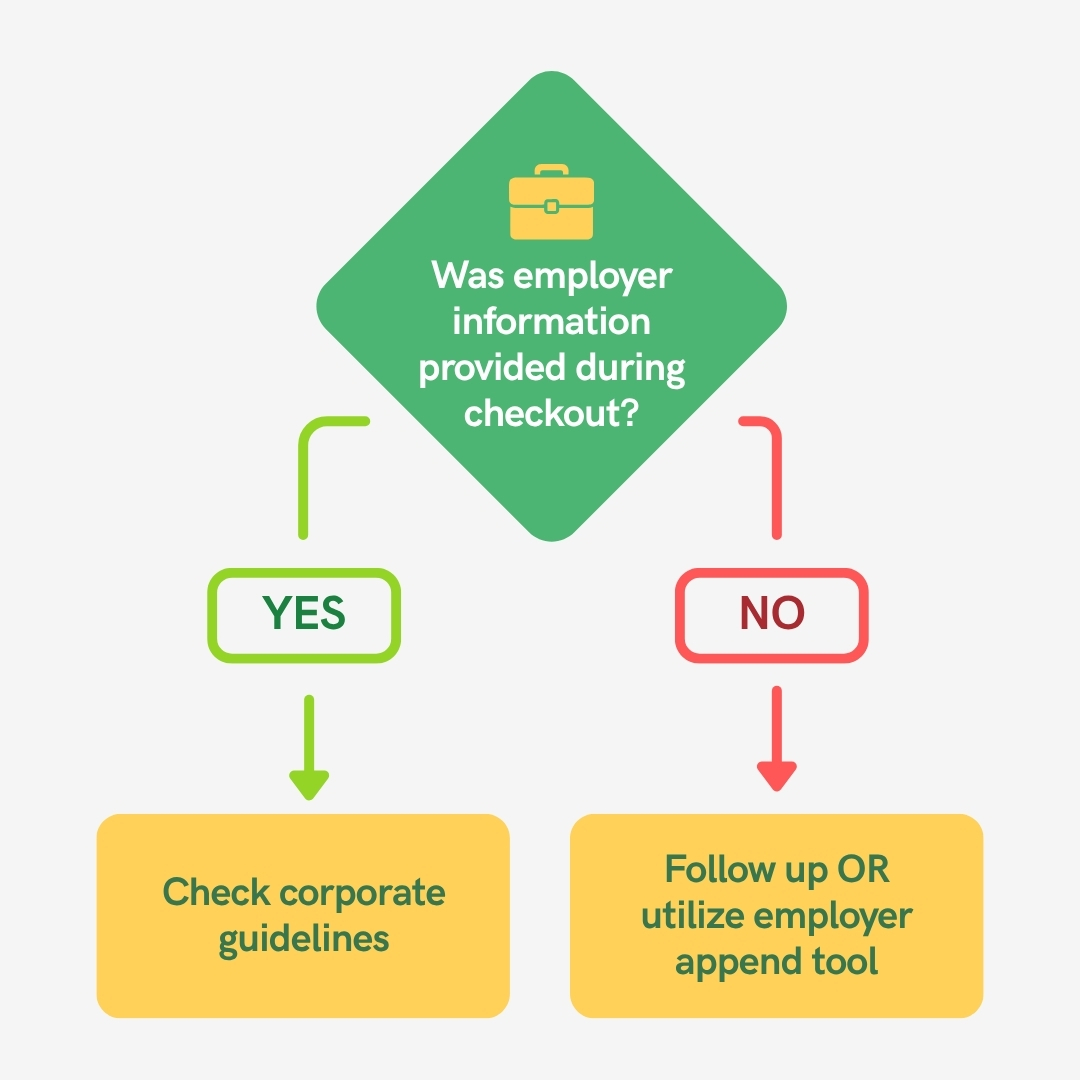
An effective operational diagram must explicitly illustrate the moments where a gift processor makes a choice. In a visual chart, these milestones are typically represented as diamond shapes that ask a clear question and split the path into separate branches based on the processor’s response.
Let’s take workplace giving, for example. If you want an accurate portrayal of the process, you must map out the exact moment a staff member evaluates a donation for match eligibility. The chart should prompt the user to ask if employer information was provided during checkout. If the answer is yes, the next step is to check corporate guidelines and track a pending match. If the answer is no, the path branches to an employer append tool or a personalized follow-up sequence to capture that missing data.
Step #4: Define your software integrations.
Modern fundraising operations rely on a complex network of technology tools, meaning your diagram must map how data travels between platforms. Your visual chart should clearly indicate where manual data entry stops and where automated software integrations begin. This helps your team see exactly how information flows between your public-facing donation pages, your central donor database (or CRM), and your workplace giving tools.
When you map these tech bridges, keep an eye out for administrative bottlenecks where manual effort can be replaced by real-time automation.
Step #5: Select clear visual indicators.
The final step in preparing your workflow for a professional layout is choosing a consistent design system. You should assign distinct visual markers (such as shapes, colors, and icons) to represent different types of backend actions.
For example, you might use a bright green dollar sign (💲) to represent bank deposits, a gear (⚙️) for internal database updates, and an envelope (✉️) for donor acknowledgments.
Once your team agrees on the raw text layout of your operations, you can pass the draft to a professional graphic service like Kwala to create a polished resource. Having a clean, well-designed document makes the workflow highly actionable for quick reference. This ensures your staff can follow the correct procedures without needing constant supervision.
Final thoughts on gift processing visualization
A perfectly visualized workflow is not just a piece of art for your office wall. It’s an active fundraising tool that helps drive your performance to new heights. When you translate standard operating procedures into professional graphic design assets, you remove the guesswork that causes administrative delays and back-office frustration. Not to mention, faster gift processing leads to quicker thank-you letters, which directly increases retention over time.
In other words, when your internal operations run smoothly, your potential expands exponentially.
Visualizing your processing workflow gives your team the operational freedom to build deep supporter relationships, secure sizable grants, and advance your mission with complete confidence.
For even more helpful insights, check out Double the Donation’s Ultimate Guide to Modern Nonprofit Gift Processing.

